What the key icon on your Android screen means and how to remove it
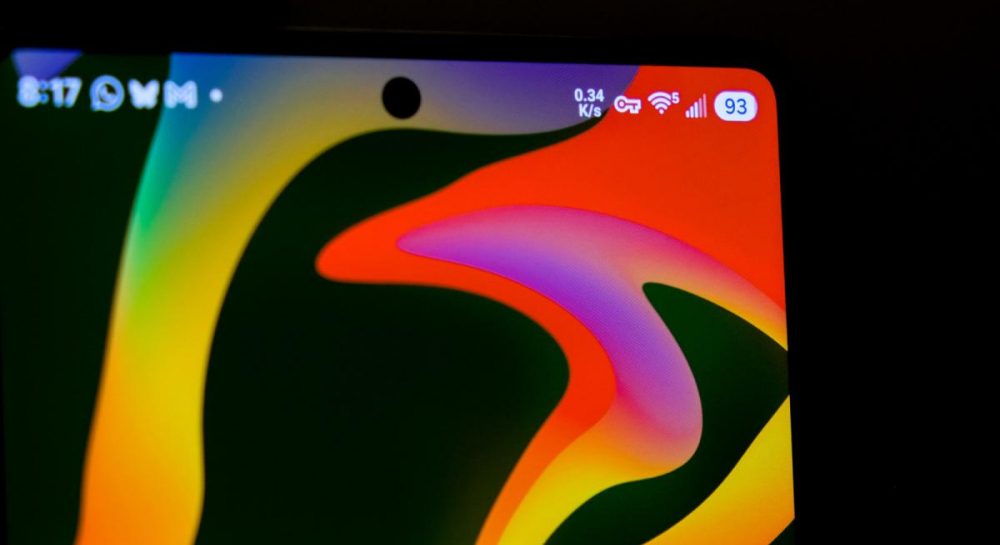
The appearance of a small key symbol in the Android status bar often puzzles users, but this indicator actually confirms that your internet connection is securely encrypted via VPN.
 💡Tech
Photo: UNIAN
Key points
- The key symbol on Android indicates an active VPN connection.
- The indicator ensures traffic encryption and hides the real IP address.
- Hiding the icon is blocked on most devices for security purposes.
- Samsung users can disable the indicator via the Good Lock app.
Modern mobile operating systems constantly inform owners about current device statuses using various icons in the notification bar. Some of these symbols remain unclear to average users, frequently causing false concerns about potential hacking or technical malfunctions. One such element is the miniature key symbol that periodically appears at the top of the screen on Android devices.
Purpose of the indicator
According to technology experts, the appearance of the key icon in the status bar indicates only one thing: a Virtual Private Network (VPN) service is currently active on the device, encrypting all incoming and outgoing internet traffic. While this symbol is visible, the user's real IP address is hidden from outside observers, and data remains protected when connecting to public Wi-Fi networks in urban environments. If the icon disappears, it means the VPN connection has dropped.
How to remove the icon
On the vast majority of Android smartphones, developers have intentionally locked the ability to hide this indicator for security reasons, ensuring the owner always sees when background encryption is active. The only straightforward way to remove the icon is to turn off the VPN connection itself. The sole exception applies to Samsung Galaxy owners, who can download the official Good Lock app and use its QuickStar module to customize notification panel icons.
While using such technology significantly enhances online privacy, it does not make a device completely untraceable. Websites and social networks can still track activity through cookies and logged-in accounts, and certain web resources may restrict access for traffic coming from VPN servers.
Source UNIAN — unian.ua/techno/gadgets/znachok-klyucha-u-paneli-na-android-za-shch… ↗
Read next
 🚨Events
Tragedy in Odesa Region: Law Enforcement Investigates Infant Death in Outdoor Toilet
In the Odesa region, police opened an investigation into the death of an infant whose body was found in a cesspool at a private household in the Berezivka district.
 ⚽Sport
Chornomorets suffers narrow defeat to Epitsentr in UPL home match
The Odessa club lost 0-1 to the visitors from Kamianets-Podilskyi during the 13th round of the Ukrainian Premier League.
 💼Economy
NBU updates exchange rates: dollar and euro show growth
The National Bank of Ukraine has set new official exchange rates for November 24, reflecting a moderate increase in the value of the dollar and euro.
 ⚽Sport
Chornomorets defeated by Epitsentr in UPL home match
The Odessa football club suffered a narrow defeat in the 13th round of the Ukrainian Premier League after conceding a single goal.
 🛡️Security
Russia Expands Military Base Near Finnish Border: Satellite Imagery Reveals Reconstruction
The Kamenka garrison, located 60 km from the Finnish border, is undergoing a major overhaul to house a new combat training center for troops, including those deployed in …
 👥Society
Munich to House Ukrainian Refugees in Former BMW Offices
Munich authorities have leased a former BMW administrative complex to provide temporary housing for up to 600 refugees, primarily from Ukraine.